Liberty Notes: A Patriotic SVG Font for Vibrant Design
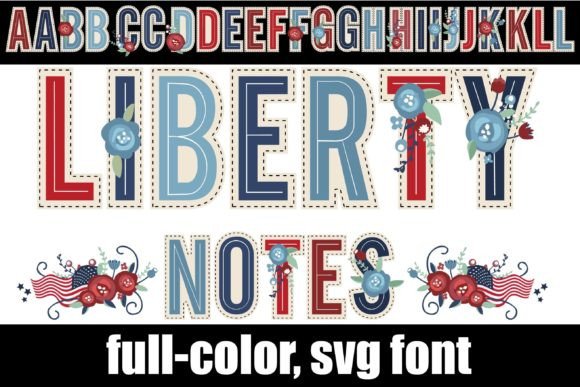
Imagine a font that doesn't just convey words but instantly communicates a theme, an emotion, and a celebration. For graphic designers seeking to infuse projects with a bold, festive spirit, Liberty Notes offers a striking solution. This full-color OpenType SVG font moves beyond static letterforms, featuring intricate serif characters adorned with a vibrant red, white, and blue floral pattern on each glyph. It’s a specialized creative asset designed to capture attention and elevate visual storytelling.
Understanding the Visual Impact of Color Fonts
Liberty Notes represents a modern evolution in typography. As an SVG (Scalable Vector Graphics) font, it embeds multiple colors and complex textures directly into the font file. This technology allows for a level of detail impossible with standard fonts, making it a powerful tool for creating high-impact visual hierarchy and memorable brand touchpoints. The key to unlocking its full potential lies in its unique access method: the flag and floral patterns are activated by typing the greater than (>) and less than (<) glyphs, providing designers with an intuitive way to add decorative flourishes.
Practical Applications for Modern Creators
The utility of a font like Liberty Notes spans numerous creative domains where thematic resonance and visual appeal are paramount. Its distinctive aesthetic makes it particularly effective for specific projects within your design workflow.
- Branding and Logo Design: Create patriotic-themed logos for events, merchandise, or American heritage brands. The built-in color palette ensures consistency across all applications.
- Marketing Materials: Design eye-catching headers for holiday sales, Fourth of July promotions, or political campaign materials. The full-color nature ensures flyers and posters stand out.
- Social Media Graphics: Craft scroll-stopping posts and stories for national holidays or brand announcements. The vibrant colors are perfect for the digital feed.
- Packaging & Editorial Design: Use it for product labels, gift tags, or feature headlines in magazines to evoke a sense of celebration and craftsmanship.
Technical Considerations for Seamless Integration
Adopting OpenType SVG fonts into your design system requires a few practical considerations to ensure a smooth workflow. First, installation is straightforward: install the .OTF file like any standard font via FontBook on Mac or your preferred font manager on Windows. However, compatibility is crucial. Color fonts will render as simple black glyphs in programs that do not support SVG technology.
To verify support, test the font within your application. Programs like Adobe Illustrator, Photoshop, Quark, and Silhouette Studio typically render the full-color version when you type on the canvas. If you only see black outlines in the preview window, your current software may not support SVG color fonts. For advanced users, an alternate version of Liberty Notes is accessible through your system’s character map, offering additional color variations for even greater creative flexibility.
Tips for Effective Implementation
When integrating a specialized asset like Liberty Notes, thoughtful application is key to maintaining a professional presentation. Use it sparingly as a display font for headlines or short bursts of text to maximize its impact without overwhelming the viewer. Pair it with a clean, neutral sans-serif for body copy to ensure readability and balance. Always consider your audience and the project's context; while perfect for festive occasions, it may not suit corporate or minimalist aesthetics. By treating Liberty Notes as a strategic component of your broader visual design toolkit, you can enhance communication, strengthen thematic elements, and deliver a polished, engaging final product that resonates with its intended audience.